

How to ask questions on Stack Overflow (and get answers)
A lot of people ask me questions when something isn’t working.
While I’m more than happy to help where I can, the questions I tend to get don’t outline enough information for me to be able to answer them. But more importantly, I might not be the best-suited developer to help.
Which is why every programmer should learn how to ask questions properly on Stack Overflow — to get the answers that they’re looking for.
I’m writing this guide to show you how to pose your questions to thousands of developers instead of just one (me).

In my opinion, the number #1 best resource for learning how to resolve your issue the fastest is Stack Overflow.
Stack Overflow is an online Q&A platform that rewards users for answering questions by giving them points. It has a powerful voting feature which is used to quickly filter bad questions out and get the good ones answered fast.
Whenever I’m having difficulty with something, I’ll submit a Stack Overflow question and typically get the response I need within an hour (depending on the time of day and the popularity of the technology). Needless to say — it’s a very effective and powerful resource for developers, no matter what your skill level.
Here is my 3-step formula to resolving any issues I encounter when coding:
Step 1 – Read the Docs
Sounds cliché, but unless you’ve put in the effort to read the documentation, few will be willing to help you out. When you get stuck your first port of call should be the official documentation of the technology you are using.
Most modern languages and frameworks will have a very detailed and searchable online documentation (if not, perhaps consider an alternative).
Step 2 – Google Search
If you’ve read the relevant documentation and still can’t figure it out, the next thing to do is run your issue through Google.
Google indexes all the forum posts and Stack Overflow questions and answers, so there is a good chance that your question has already been asked and answered somewhere else.
When searching Google, use keywords instead of phrases. Avoid typing things like “not working” or “is broken” as this will not return good results. Start the search with the technology you are using, then include snippets of any error messages or outputs you are getting.
Step 3 – Ask on Stack Overflow
If you have read the documentation, done a Google search and you still haven’t found the answer, it’s time to ask your question on Stack Overflow.
Register/Login
Before you can ask a question, you need to have an account.
You can sign up here.
Having a complete and nice looking profile will improve your chances of getting your question answered.
Here are some tips that will help your account look professional:
● Add a profile picture
● Use your real name
● Add some tags
● Add some details to your profile
Here is what mine looks like:
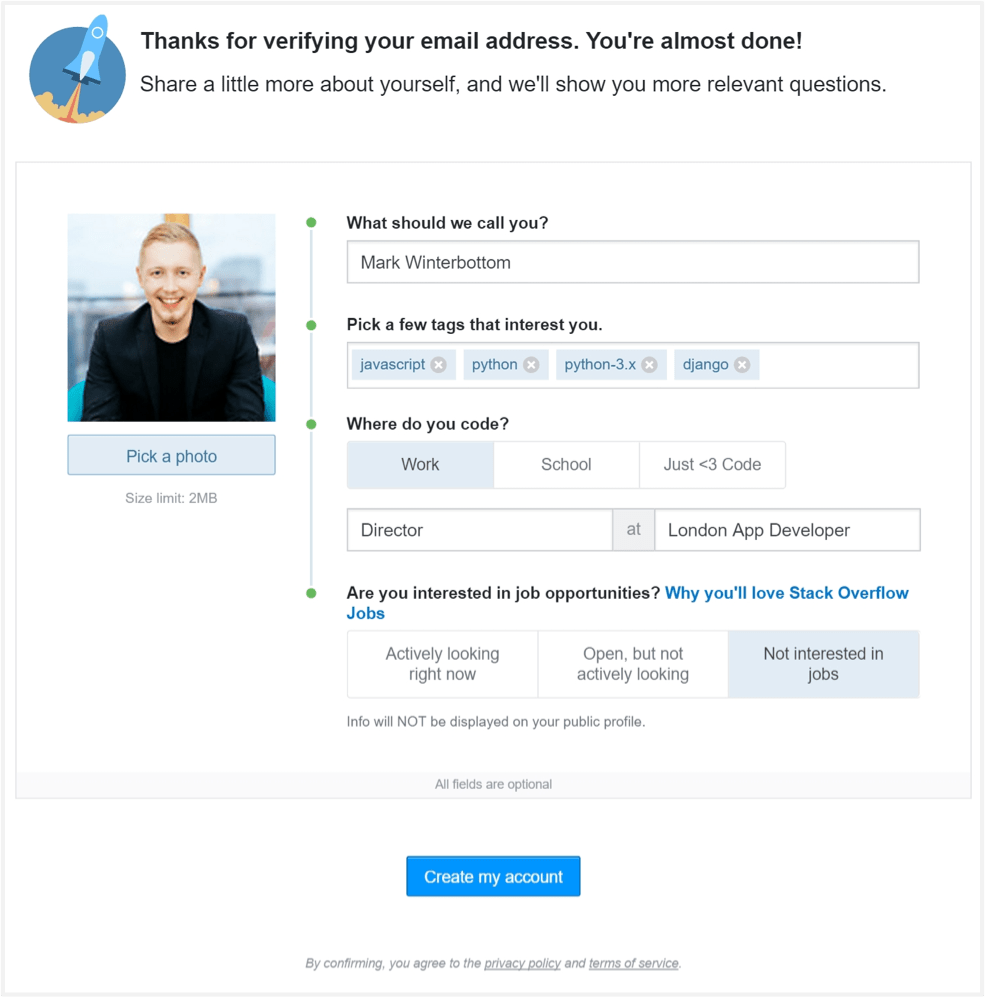
And here is what my profile looks like to the public.
Once that’s done, it’s time to create the question.
The goal is to ask a specific question that encourages a specific answer. Generic questions like “What is the best language” or “What JavaScript framework should I use?” are too vague and will likely get down-voted by the community.
Choosing a Title
The first step is to choose a title. There is a character limit of 150; so short and sweet is what we want. Include the names of the technologies you are using to capture the eye of the experts in those fields.
Here are some examples of my questions:
● Django creating a custom model field
● Upgrading from Django 1.6 (with south) to 1.8 doesn’t modify ‘last_login’ on the user table
● Django Rest Framework PrimaryKeyRelatedField clearing if not set
As you can see, each one specifies the technology I am using with a hint to the topic.
Writing Your Question
The next step is to write the question. When writing your question, make sure to follow these basic rules:
● Use correct spelling and grammar
● Use code snippets and quote blocks appropriately
● Use the Stack Overflow image upload feature to insert screen shots
It’s best to break it down into the following sections:
Describe what you are trying to achieve
Begin your question by describing the overall result you are trying to achieve. Do this because someone may suggest a better way to achieve your result, completely bypassing the issue you are having. This has happened to me a number of times.
For example, in one of my questions I start by writing:

Explain what you have done so far
After describing what you want to achieve, explain what you have tried so far. This should include any relevant code snippets.
If you have it, you may also link to your project’s code on GitHub (or other Git service). However, don’t do this as an alternative to including snippets of the code in the question. Remember that you are asking people to help you for free, so don’t expect them to spend hours looking through your code trying to figure it out.
This is also where you can link to any documentation you have been following.
Here’s an example where I have explained what I tried so far:

Describe the output you are getting
Next you want to describe what is happening. Make sure you include any error messages you are seeing.
Ask a very specific question
Always end by asking a very specific question that you want answered. This should be no longer than one sentence. Here is the example from my post:

Choose Appropriate Tags
Tags are important because it’s how Stack Overflow will ensure the correct developers see your question. You can choose up to 5 tags. I recommend adding as many as you can.
Editing
One of my favourite features of Stack Overflow is that you can edit your question after posting. This means that you can constantly refine and improve it based on the feedback you get in the comments.
After posting your question I would suggest giving it another proof read to see if there is any way you can improve upon it.
Before long you should have some helpful developers offering their advice to solve the problem.
That concludes my guide for asking questions on Stack Overflow.
Thanks for Reading!
Cheers
Mark


Good Article I like the reference of different job boards.