• Shopping Cart Shopping Cart
    0Shopping Cart
London App Developer
  • Courses
  • Consulting
  • Tutorials
  • About
  • Click to open the search input field Click to open the search input field Search
  • Menu Menu
Guy standing in front of a whiteboard with a pen trying to problem solve
Career advice, Productivity

How to handle a colossal project

Towards the end of 2016, I decided to start making videos to share on Facebook and YouTube.

I blocked out some time in my calendar to make 3 videos a week.

Since I do freelance work during the week, it meant that I would have to do them in the evenings between dinner and bed.

I estimated that (in theory) I could quickly knock out a 20 minute video in 30 minutes between 9 and 9.30pm and be in bed early enough to get my full 8 hours.

In reality, most nights I would spend 2 hours getting frustrated and making multiple re-takes until I just gave up!

I ended up just doing videos when I had time on the weekend… Then eventually I gave up completely.

In 2017, I committed to releasing 3 full video courses. The first one will cover Python, from zero experience to beginner.

I knew that if I wanted to deliver on this goal, I needed to improve my process so I don’t do what I did at the end of last year. Which was basically overstretch myself and give up entirely.

Brooke and I sat down and brainstormed how we can improve our video production process together. The answer we came up with was to break the task down into smaller, manageable chunks.

Instead of aiming to do a full 20-30 minute video, I would just break it down into multiple 3-5 minute videos.

And I committed to doing on average one of these short videos a day.

During the week I would still have to do these videos at night, but if I aim to produce something short and concise, and I give myself a realistic time-frame to achieve this (one hour as opposed to two), then I should be able to meet my goal, and still meet my basic needs like a full 8-hour sleep and enough time before bed to read and wind down.

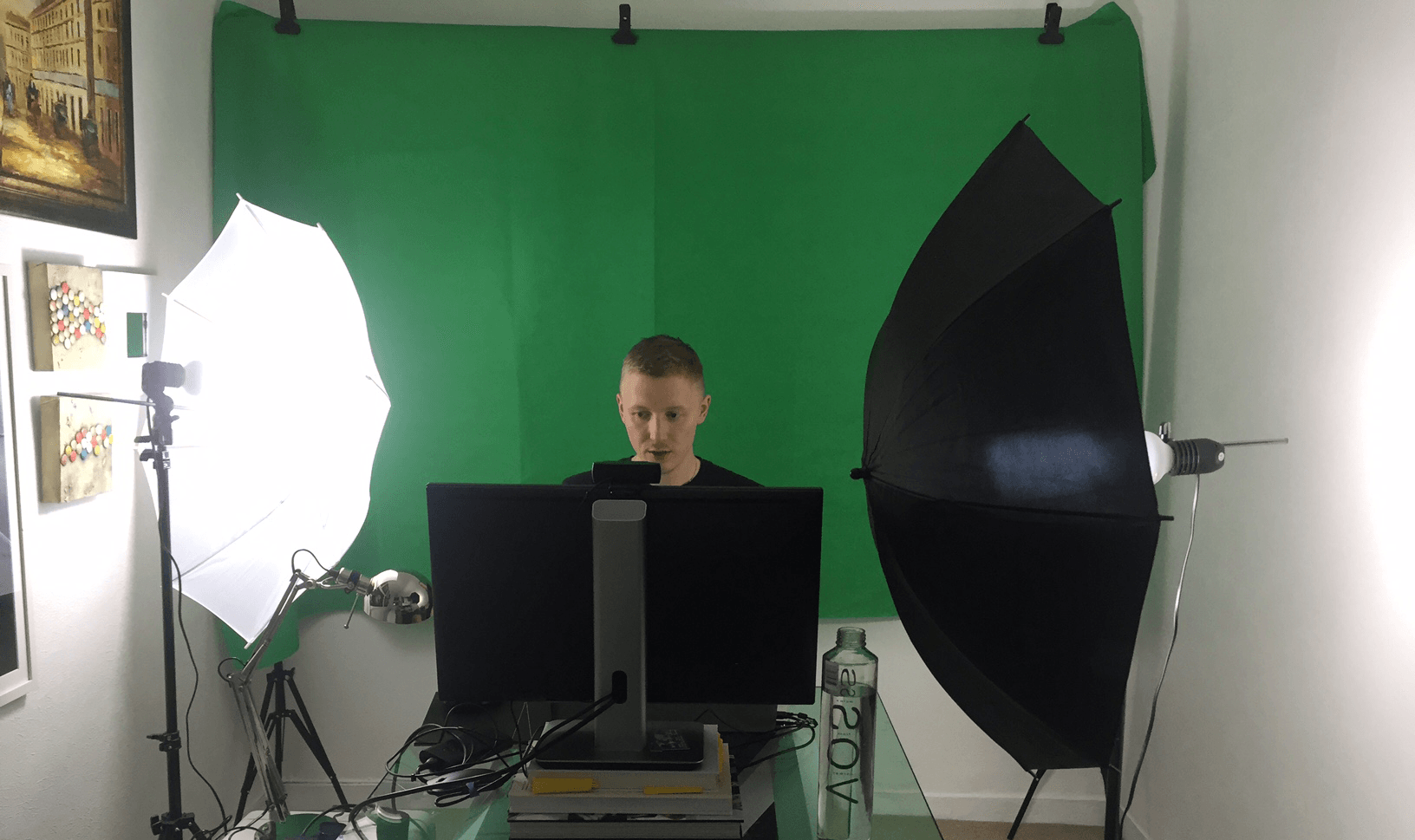
I also realised that I was spending almost 50% of my time setting up my environment (lights, position of camera, putting green screen up, taking it down, etc.). So we re-configured my “studio” so it’s set up along the back wall of our office. It’s now out of the way of our working space and because of this I can leave it up and not have to worry about adjusting it every time I need to film.
London App Developer

I also bought a new webcam so I no longer have to use my laptop AND monitor to film (which takes up double the space and makes the filming experience a bit disjointed). Between these adjustments I’ve saved 50% of time and can now meet my target of one video a day a lot easier.

I’m only a few days in but I’m already seeing the results I set out to achieve.

For every new project I embark on, I find there’s always a honeymoon phase – when you’re really pumped and excited to be working on something. It’s the weeks and months that follow that become challenging. But I feel as though I figured out a routine and a set-up that is reasonable and easy to action.

I’m sharing this goal here with you so I can be held accountable for it. If you have a partner, friend, flatmate or family member that can help hold you to your goals, I strongly recommend reaching out to them and asking them for support.

So far I’m averaging 2 videos a night (100% more than I thought I would do). Compared to last years 1 or 2 a week!

And most importantly, I am now ENJOYING making videos!

This experience has got me thinking about how important this lesson is when it comes to programming.

Many times I’ve faced daunting technical challenges. Sometimes it’s a personal project I want to get done. Other times it’s a colossal freelance project that feels like the more I work on it the more work is created.

But now I take comfort in knowing that the key is just to break it down into small, manageable chunks. It also helps to assess where the biggest pain points are. For me, it was the environment set-up. For you, it might be an onerous manual task that can be automated to save time.

So, whatever your challenge, no matter how big: Break it down and chip away at it.

Take the time at the start of the project to break it down into smaller tasks and use JIRA, Trello or whatever works for you to track the progress.

Then just chip away at it day by day, and you will be amazed at what you can achieve!

Thanks for reading and I hope this was helpful.

Cheers,
Mark

Share this entry
  • Share on Facebook
  • Share on X
  • Share on WhatsApp
  • Share on Pinterest
  • Share on LinkedIn
  • Share on Tumblr
  • Share on Vk
  • Share on Reddit
  • Share by Mail
https://i0.wp.com/londonappdeveloper.com/wp-content/uploads/2017/02/HOW-TO-HANDLE-A-COLOSSAL-PROJECT.png?fit=277%2C223&ssl=1 223 277 mark https://londonappdeveloper.com/wp-content/uploads/2018/12/lon_website_logo-300x110.png mark2017-02-03 10:36:182017-02-03 10:36:18How to handle a colossal project

Pages

  • About
  • Consulting
  • Home
  • Tutorials

Categories

  • AI
  • Android
  • Android Studio
  • Angular
  • Aptana Studio
  • AWS
  • Bootstrap
  • Career advice
  • Celery
  • Databases
  • Deployment
  • DevOps
  • Django
  • Django REST Framework
  • Docker
  • Eclipse
  • Getting Help
  • Git
  • Git Bash
  • Git Flow
  • GitHub Actions
  • Google App Engine
  • IDE
  • Ionic Framework
  • iOS
  • JavaScript
  • Job Search
  • Links
  • Linux
  • Mac OS X
  • macOS
  • Node.JS
  • OpenAI
  • PGAdmin
  • Postgres
  • Productivity
  • Python
  • React
  • Salt Stack
  • Stack Overflow
  • Tools
  • Travis-CI
  • Tutorials
  • Ubuntu
  • Uncategorized
  • Vagrant
  • VSCode
  • WebSockets
  • Windows 10
  • WordPress

London App Developer Ltd,

71-75 Shelton Street, Covent Garden, London, United Kingdom, WC2H 9JQ

Company registration number: 09718346

© London App Developer - London App Developer Ltd, Company Registration Number: 09718346, VAT: GB224061842
  • Link to X
  • Link to Youtube
  • Link to Facebook
  • Link to Reddit
Link to: 5 tips to avoid programming-related injuries Link to: 5 tips to avoid programming-related injuries 5 tips to avoid programming-related injuriesGuy with bandaged wrist carrying a backpack giving a thumbs up Link to: Five reasons to write proper commit messages Link to: Five reasons to write proper commit messages The word commit on a pink backgroundFive reasons to write proper commit messages
Scroll to top Scroll to top Scroll to top

This site uses cookies. By continuing to browse the site, you are agreeing to our use of cookies.

OKLearn more

Cookie and Privacy Settings


How we use cookies

We may request cookies to be set on your device. We use cookies to let us know when you visit our websites, how you interact with us, to enrich your user experience, and to customize your relationship with our website.

Click on the different category headings to find out more. You can also change some of your preferences. Note that blocking some types of cookies may impact your experience on our websites and the services we are able to offer.

Essential Website Cookies

These cookies are strictly necessary to provide you with services available through our website and to use some of its features.

Because these cookies are strictly necessary to deliver the website, refusing them will have impact how our site functions. You always can block or delete cookies by changing your browser settings and force blocking all cookies on this website. But this will always prompt you to accept/refuse cookies when revisiting our site.

We fully respect if you want to refuse cookies but to avoid asking you again and again kindly allow us to store a cookie for that. You are free to opt out any time or opt in for other cookies to get a better experience. If you refuse cookies we will remove all set cookies in our domain.

We provide you with a list of stored cookies on your computer in our domain so you can check what we stored. Due to security reasons we are not able to show or modify cookies from other domains. You can check these in your browser security settings.

Google Analytics Cookies

These cookies collect information that is used either in aggregate form to help us understand how our website is being used or how effective our marketing campaigns are, or to help us customize our website and application for you in order to enhance your experience.

If you do not want that we track your visit to our site you can disable tracking in your browser here:

Other external services

We also use different external services like Google Webfonts, Google Maps, and external Video providers. Since these providers may collect personal data like your IP address we allow you to block them here. Please be aware that this might heavily reduce the functionality and appearance of our site. Changes will take effect once you reload the page.

Google Webfont Settings:

Google Map Settings:

Google reCaptcha Settings:

Vimeo and Youtube video embeds:

Other cookies

The following cookies are also needed - You can choose if you want to allow them:

Privacy Policy

You can read about our cookies and privacy settings in detail on our Privacy Policy Page.

Privacy Policy
Accept settingsHide notification only